The Technical Account Manager (TAM) and other customer facing interviews

One way I’ve decided to help is give a better explanation of what certain IT roles are so it helps you understand it more as you move into around in IT jobs. One of them I’ve heard is about a TAM.

The Technical Account Manager (TAM) is a person hired by a product vendor (For example, Microsoft, Google, Amazon), that owns either one or multiple accounts or end customers. The TAM is responsible for ensuring the end customer is getting technical updates, briefed on technical issues, and manage support tickets, and even explain new technologies as it might help the customer.

Your day to day job is really to ensure the customer is happy with the products they got, if there are bugs, you have a good way of tracking and reporting back, following up, and providing guidance. You interface with the customer and your own organizations support organization, such as development, engineering, and support to provide updates and help them address it. You also engage product specialist to help answer questions that are very deep or help find the answers in your organization and provide it back to the customer.

INTERVIEWING FOR THE ROLE?

If you are being interviewed for this role, and this role sounds like something you want to do, some excellent traits to demonstrate are:

Communication:

Most importantly – excellent communication skills. You have to explain problems very well back to the support team, and able to translate complex workarounds to the customer so they understand how to apply it. Also, you have to effectively communicate timelines clearly, and next steps.

For example, if I had to answer a “How would I manage a customer ” question in the interview, I would always answer with a process:

“I normally would ask the customer the problem, try to get as much detail as possible and document it live on a zoom meeting. That way they can see what I’m writing down and reduce any errors as it increases communication issues. I would also ensure any of my questions or any other details from the customers are captured, and then commit to a timeline to follow up. I would not commit on a resolution time, as that can be dangerous and harm our relationship. I would also ensure I have proper follow up notifications on my calendar to make sure I don’t miss updates or commitments.”

ITJob.Coach response

The above response shows:

  • You’re aware of customer’s perspective towards your company’s brand.
  • You’re proactive – thinking of where problems can come up.
  • You’re great with process and structure.

Complexity:

Another common part of these interviews is to see if you can make it easy for the customer calling you. Being able to take something that is complex but explain it in simple terms is an attribute you want to show in an interview.

Think about questions like this:

  • “Please explain how a belt buckle works without using your hands.”
  • “Explain how a computer works.”
  • “Explain how to tie your shoes without any gestures.”
  • “Teach me how to ride a bike with only words.”

Remember to break everything down to steps to make it manageable. The better you can do that, the easier it is for you to answer questions. For example, with the computer, start with CPU, then RAM, then disk and then peripherals, like a keyboard. For the bike, start with “location”, “what to wear”, “Starting Position”, and “Action in Motion”. As long as you break it up in whatever steps, it gives you a way to talk about it without choking.

Managing/Coordination

A great coordinator – organizing several customers with several technical issues can be complex and overwhelming. You need to show you are great with processes and documentation. Any stories from your past, or how you organize complexity (like business project, or large deliverables) from previous roles will help demonstrate this. See my video on YouTube on MS Whiteboard, as you can set those up to present it.

Effective Listening

One great skill you should have in customer facing roles is to have great listening. Showing how you can listen effectively (no interrupting), and able to repeat what they said and get confirmation is an excellent skill. Know that the interviewer will be gauging you on this. Are you listening to the problem well? For example, let’s say the interviewer is asking you the following question:

“A customer calls in to say that his service is down. He says there’s a flashing green and red light on his dashboard, and is complaining that his service is very important to him. What do you do?”

How many of you would jump to answering? An effective communicator does not just talk, but listen. A proper answer would be:

“So… You’re saying a customer called in and is saying his important service is down, and he’s seeing red and green flashing lights on his dashboard?”

ITJob.Coach Response

So my response lists some key words that show it’s fully understood, such urgency (important), the what (the colored lights), and the source (dashboard). Being able to recap and get confirmation before you start is a great strength in customer facing roles and should be practiced.

1 Bit of Advice:

Whether you are going for a TAM interview, or a customer support engineer, the skills are pretty much the same. Can you listen? Can you coordinate? Can you communicate well? Also if the problem is really complex, can you make it easily understood? I hope that helps! Good luck and Stay Safe!

Rick@ITJob.Coach
Google explains what a Solutions Architect Does

Good day everyone,

What a busy week! A few things today that I’m excited to share:

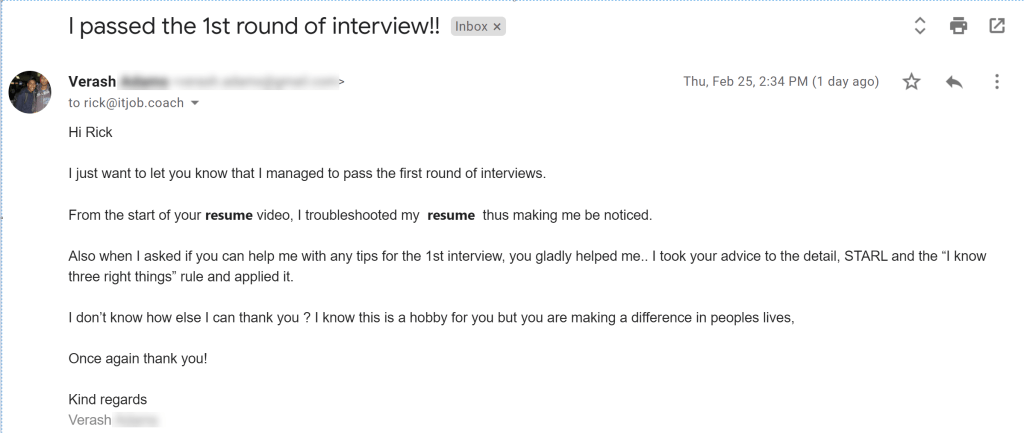
First – I had 2 very nice reach outs this week. I’ll share one of them below as the other is too personal for me to share publicly. Thank you, Varesh for taking the time to write and give me an update! I’m super proud of you and, and I’m glad it’s helping you make your life better! I wish you best of luck!

The second, is a surprise video that I’ve been waiting to post from my good friend James Van Kessel. He is an elite cloud architect that is brought in to help cloud architects fix solutions. Not only does he know what skills are required, but he also has major experiences in architectures of all types, and understand the mindset it takes to do well in the IT market.

Please enjoy the video:

Finally, if you have questions that you want me or James to cover, please put the comments on the YouTube comment. I can also take emails is Rick@ITJob.Coach, but as I discussed, I might not be able to get to it.

Thanks and stay safe!

Rick@ITJob.Coach

Confusion about the Architecture Role

The biggest complaint I have is the labelling of the certification programs. You get a driver’s license, you can drive. You get an Amazon Solutions Architect Certification, and you can’t be a solutions architect??? What gives?

There’s so much confusion about the role of being a solutions architect that I will be doing a video on this topic very soon and explain why your certification doesn’t mean you can get a solutions architect job.

Between the groups I teach, mentor and coach and my day job, I wish I can do more for you all. I will be creating a video in the very near future to explain this in detail to hope it doesn’t cause more confusion. For all of you, follow my resume advice and apply for those jobs. It’s all there, there’s minimal tricks.

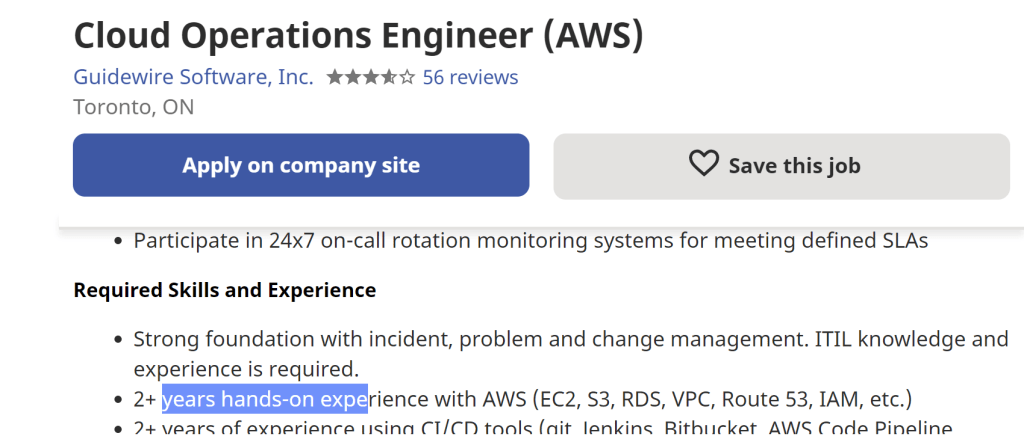
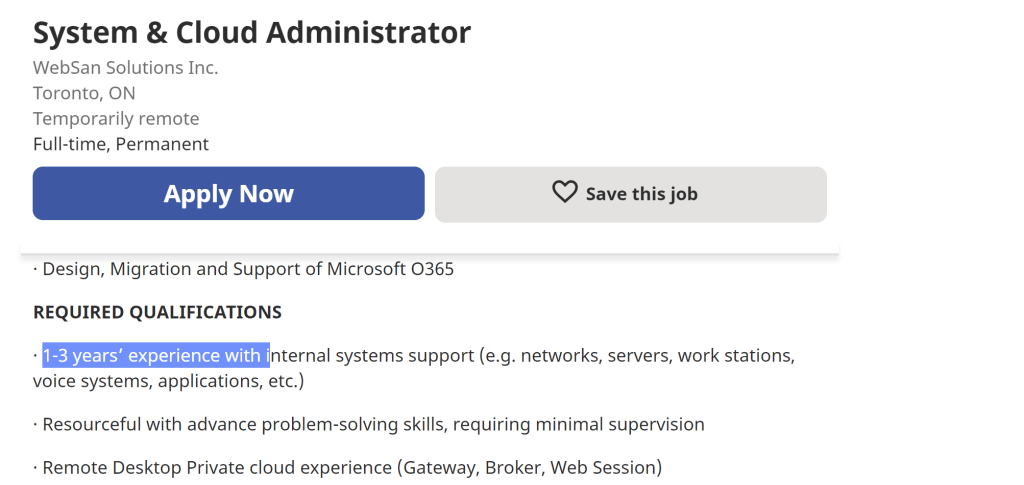
To get a job with a certification but minimal skills – Make sure you focus on jobs that state “1-2 years experience”, not the jobs asking for “5-10 years”. Forget the title. Do searches for “Cloud” in the title. For the ones requiring experience of 1-2 years, your certification will give you 80 points/100 points to get that interview. Some examples of jobs can be “Cloud Analyst, Cloud Support Engineer, Cloud Associate, administrator, operations, etc”. However, some smaller companies mis-match these word titles, in which case, focus on the 1-2 years. See these examples:

Here is another junior role that you can probably get with a proper resume:

To get the job, make sure you follow the resume videos, the interview videos. Also, make sure to watch my whiteboard video (click the URL to my YouTube and learn about the Whiteboard video). I’ll explain why this matters, and how you can land an IT job with that skill.

Quick skills to learn: Learn Linux, learn basic scripting, and learn networking. If you need to submit a resume now, watch my resume video on how to put this in your resume now – but get trained before you get a job.

This one is a quick blog. Many exciting things happening. Stay tuned – once my YouTube gets close to 100 viewers, I will launch an awesome video with a big surprise. (Should be a day or two away).

P.S. I’m super excited, some of you gave me an update and I’m extremely humbled at your emails. Thank you so much! Also, for those in my network that reached out to want to help my viewers, I’ll be reaching out to you as well. You’re all awesome!

Stay safe everyone!

Rick@ITJob.Coach

VMware advice for an IT Career

My friend Jeff Davey, Senior Manager  at VMware talks about IT Careers, where to develop skills  and evolving trends.

Follow Jeff on Twitter @vJeffD

VMware is deployed in over 80% of organizations and has been a pioneer in virtualization and cloud automation for the hybrid cloud.  For those getting into the field, knowing this technology is essential in landing a good career.

I’ve provided below a quick summary of VMware’s evolution in the data centre space for you to understand how they evolved.

VMware Phase 1:

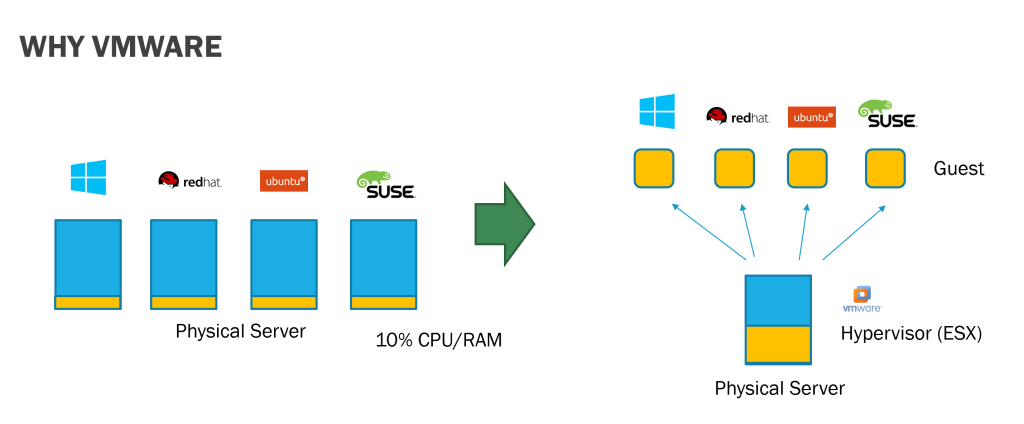
Enable virtualization of common servers to fully utilize the CPU and RAM for great savings to an organization. A normal server running one task can now run multiple tasks by virtualization – also securing the virtual machines from each other and access to the core system.

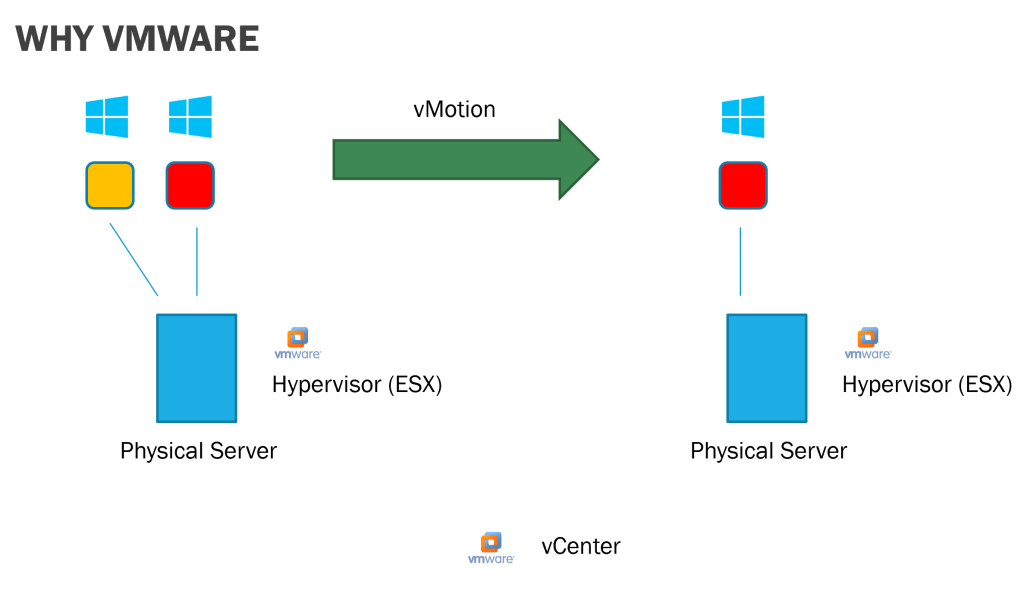
Leveraging vMotion and storage vMotion, companies were able to migrate (in real time) a VM running on one server to another. This allows companies to get rid of old servers and old storage devices without weeks of planning/cutover. Also, the automatic failover capabilities provided by tools like VMware SRM, allowed higher uptime for companies.

VMware Phase 2:

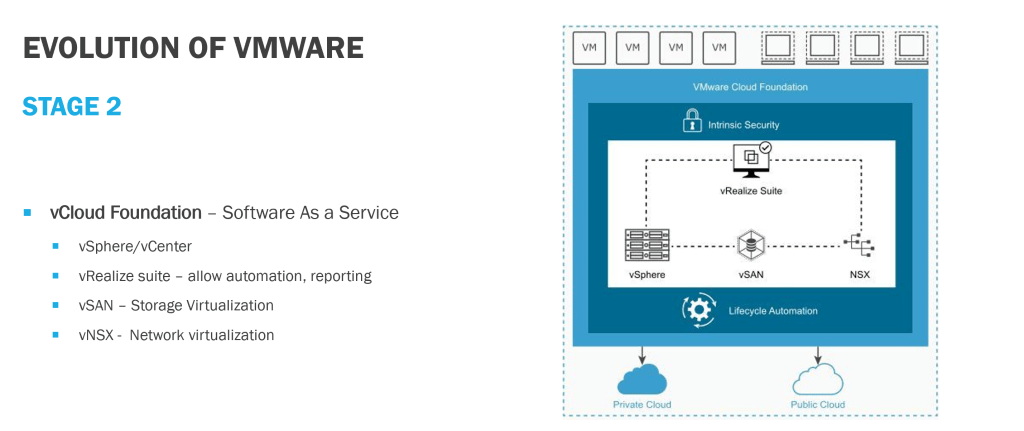
The ability to leverage vCloud Foundation to automate and provision infrastructure (compute, network and storage) by integrating the ESX systems with vSAN (storage virtualization), and NSX (network virtualization). This allows data centers to operate like cloud environments, with chargeback and single pane of glass operations across multiple data centres.

VMware Phase 3:

We are not in the phase 3 strategy of VMware with the new VMware Tanzu. As we discussed in previous blogs, companies run on average 2.8 cloud. Tanzu allows organizations to bridge all clouds, and their local data centre with a single pane of control. The migration of VM’s and storage across each cloud will be seamless without worrying about conversion and migration. As well, Tanzu allows an infrastructure up approach as well as a developer down approach. Tanzu integrates with container repositories and can deploy apps as well as VM’s from a single software suite.

Summary

VMware is the virtualization technology of choice. Anyone joining the IT workforce should definitely get familiar with this technology. Jeff has provided more links for you to expand your knowledge:

Good luck and stay safe,

Rick @ ITJob.Coach

The Secret to a Tech Interview

So many of you have reached out for help on Interviews that I had to rush through this article!

Firstly, I’m glad the resume suggestions have been so effective! If you put some time and effort, you’ll get that interview in no time! Secondly, yes – this might be your first interview or it might be your hundredth. I’ll show you some tips and secrets to get you that job offer in this blog!

There are 4 category of questions that you’ll be asked. These include:

  • Common Questions
  • Scenario Questions
  • Technical Questions
  • Awkward Questions

COMMON QUESTIONS

Common questions include the same boring questions that are asked everywhere, no matter if it’s an IT job or not. It’s questions that haven’t changed but some people still lead with these questions. You can quickly google a lot of these questions and get a list. You should prepare for these questions like an exam. For exam, the “Tell me about yourself?” or the “What are your strong qualities?”.

Here is an awesome way to begin practicing a skill to train your brain. You should write out the answer to these questions, you must do this in full. Trick: Use Microsoft word dictation feature. I guarantee that if you keep practicing this skill you will increase your chances of landing a job a lot.

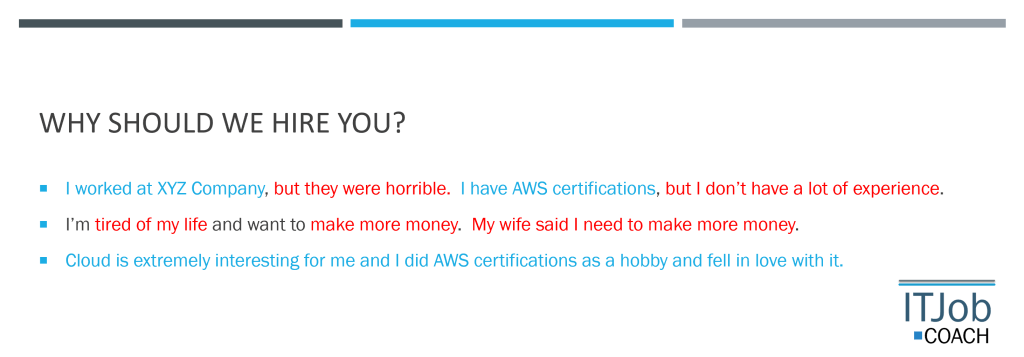
Use my ITCoach.Job secret trick and get a red and blue pen and underline everything that is negative with red. Negative means you talk negatively about yourself, show a weakness, or talk negative about someone or something else. Now, underline everything you see as positive with the blue pen. These include positive features, naming a recognized skill, brand, or talk about your skills. Keep practicing this and remove as much red as possible when you answer these questions. Repeat and repeat. Now you’ve trained your brain up for the interview!

SCENARIO QUESTIONS

The second type of questions are “Scenario” based. These questions start with “Tell me a time …”. The best approach to answer these questions is using STAR.

  • S – Explain the Situation, such as the location or place.
  • T – Explain the Task you have to do.
  • A – Explain the Action that you have to do
  • R – Explain the Result of the action.

The STAR approach is popular if you’re interviewing for Google, or Amazon style jobs. However, I’ll give you another ITJob.Coach secret. Include L for Learning.

  • L – Explain the key learning

You’ve just differentiated yourself from hundreds of applicants by showing that you’re someone that continuous learns, is self-aware, and is always improving yourself.

TECHNICAL QUESTIONS

The next Interview Question is the Technical question. You can either get this really quickly, don’t know it, or get so nervous you fumble trying to answer your question. The secret is using a process. Remember this sentence: “I Know Three Right Things”. Once you have this, you can answer any technical question with a process.

  • I is for Impact – quickly identify the severity of the problem and who you need to notify
  • K is for Know – do you have the skills to answer this, where do you get the skills?
  • Three places to check: The System (CPU, RAM, Disk), The network, and the App logs/Windows logs
  • R is for Report – collect the time, logs, tasks lists for future troubleshooting or giving it to the vendor. Enable verbose mode, etc. on your logging systems.
  • T is for Team – Notify your teammates, or the teams of other IT staff that might be impacted, management, etc.

By answering this way, you pretty much can answer any technical question. Instead of giving an answer, you’re showing how you would troubleshoot it. Another ITJob.Coach bonus tip – make sure to get the hiring manager’s email. For the ones you don’t know, write it down in the Interview, and email him the answer with your thank you letter.

AWKWARD QUESTIONS

Finally, the last questions are the awkward question. These include questions that take a lot of thinking and reflecting. For example:

  • Why are man whole covers round?
  • How many toothpicks fit in a van?
  • How was your life affected by Covid?

You take everything you’ve learnt from before:

  • No negatives
  • No quick answers, show your work by talking through your process
  • Explain in a systematic way

By practicing the other 3, you can naturally get more talented with these types of questions. You can still get stuck, and get to a point to say I’d have to get back to you on this answer. It’s a very good answer to say that rather than I give up! Also, grab the email and get back to them.

QUESTIONS FOR THE HIRING MANAGER

Finally, you can also ask questions to your hiring manager. A job interview is 2 ways. Do you want to work there? I’ve not taken many jobs because the culture does not fit my style. Make sure you always have good questions – good questions show that you actually think through things. It’s totally fine to ask them some questions about the work environment, what’s important for them, etc.

I’ll go deeper into these categories in future writeups, but this should give you a great start! Good luck in landing that job!

Stay Safe!

Rick@ITJob.Coach
Great News

Hi Folks,

What a great week! It was good news after good news. Two of the people I’ve been mentoring is getting a promotion and the other is moving on to senior role! I wish them all the best in their new positions! Also, several people from my forums, my blog, and my other online postings have told me they followed the resume building and now have interviews! Congrats also to you all! I’m glad this is helping you out! To answer some questions:

  • Do I make money off this? No, I don’t charge or get paid to do this. This is not a business for me. I’m very thankful to have a great job and this is my way of giving thanks by helping you all out. I’ll try to keep this going based on participation. I even pay out of my own pocket for ITJob.Coach since it’s easier to manage.
  • Do you do other forums ? Yes – I have multiple forums, Facebook groups, a blog (ITJob.Coach), and I mentor large groups of IT pros on a private group in real time, and also speak at many IT conferences and some universities/colleges. A lot of the content from those sites get consolidated and put on YouTube. Sorry, the private ones aren’t shareable.
  • How to reach me – You can try to reach me via email (not FB messenger – I hardly check that). This is just my passion hobby that I do in my spare time. I have a full time job managing a country of IT architects and my commitment is to my students that I mentor. I won’t be able to help you individually – although on the rare occasion I do, I can try to respond. (email rick@itjob.coach). Last I checked I have over 200 unread messages at ITJob.Coach. Try to get everything down to 1 email, I won’t be able to correspond back and forth.
  • How can you help me? If you want to help me, please comment on the YouTube channel and subscribe. I have a goal of reaching 100 subscribers. Also, please post your questions either on YouTube or here. If you don’t ask the questions, I can’t answer them.

I wish you guys good luck in your careers and good health

If it sounds too good…

Folks – please be warned – there are some scams going around with people pretending to offer jobs. They get your resume, then set you up on an interview claiming they are headhunters. After the interview, they ask you for a lot of your personal information and then do identity theft/etc.

Please be careful. I suggest you take the following actions:

  • Research the job placement company contacting you.
  • Look them up on linked in and other credible sources.
  • Do the research of the company that you’re interviewing.
  • If they contact you on Facebook quickly if they are an actual user or not via how long they’ve been active, etc.
  • Also, check the credentials of the person you’re interviewing via LinkedIn also, make sure you get an email to contact them with their company name, and phone number.

Stay safe my friends!

Rick

ITJob.Coach

How to Make your Online Meetings Awesome!

Everyone is getting meeting fatigue in their IT roles. The following tool will help you add life back to an overdone meeting. It’s called Microsoft Whiteboard, and it can be downloaded here for free:

https://www.microsoft.com/en-ca/microsoft-365/microsoft-whiteboard/digital-whiteboard-app

Microsoft Whiteboard is easy to use, and there are cool tricks to make you a pro at using it even if you’re not a good drawer. This can be done by using Logos, ready to go images, and prearranged templates as covered by this YouTube Video.

I hope this tool is useful for you and you find the tutorial helpful!

Stay safe!

3 Common Problems on Resumes

Based on the questions I’ve received, I am doing one more video to clarify and simplify some of the content. A lot of questions wanted to see how I actually build a skeleton, identify skills required, etc. So I’m answering the 3 most common questions I’ve been hearing.

Question 1 – How to get Skills?

Differentiate between Skills and Experience. Skills is knowing how to do something, while Experience is actually doing it. If you read up, study, and understand it and also practice doing it, then it is a skill. This is similar to going on a course and learning the material. What you don’t have is the experience – but that can be accomplished by repeatedly doing it over and over, or watching that section of a course of applying it and trying it yourself 5 to 10 times.

The easiest way to add skills to a resume is to go to a course summary or syllabus and identify the skills you know well. This doesn’t mean you know what it is, but you know the reason you use, you know 70% to 80% of the options of it, and you’ve read up on the source material (Vendor product documentation, watches some videos on it, know the gotchas, etc.) You can then capture that info into your resume.

For example, if you’ve taken Neal Davis’s course on AWS Practitioner, you can add the following skills to your resume if you know it well. (This is created from the video above.)

Skills:

AWS Environment:

  • Region/Global AWS Services
  • VPC, Security Group and Network ACL management
  • CloudWatch and CloudTrail for monitoring and logging, AWS Config for config management
  • Management of Route53

AWS Security:

  • Deployment of WAF, SCP and Shield.
  • IAM applications with Users, Groups, Policies, and Multi Factor Authentication (MFA)

Infrastructure and Storage:

  • EC2 management with user data, 
  • Designed failover and Recovery systems with Auto Scaling Group and Elastic Load Balancing, AMI and EBS Storage management, snapshot management
  • S3 Management, storage lifecycle policy, EFS Management
  • Intermediate RDS management knowledge – PosgreSQL, RDS, Aurora

Migration Services:

  • AWS Database Migration Service, Service Migration Services, and Snowball

knowledge: Lambda, including ECS, EKS and Fargate, and Container , RedShift and ElastiCache, Cloud Formation, SNS, SQS

Question 2 – How to identify Skills required from a Job Posting?

This section will show you if you have right skills for that job or if you’re wasting your time? There is a science to understanding Job Posting to see if you have all the skills required. It’s a big document with a lot of skills required, but what’s most important?

Mandatory skills

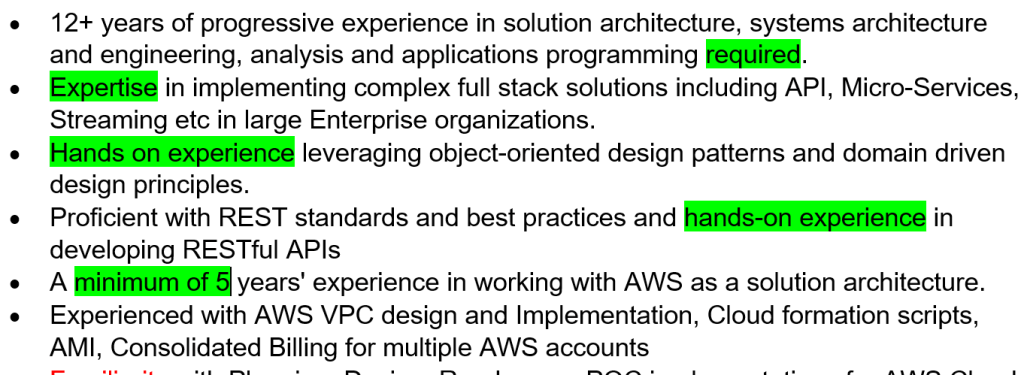
Mandatory skills are listed with hard words – like “Required“, “experienced“, “Minimum“, “Must have“, etc. They are the minimal requirements that if you don’t have it, chances are that you won’t get an interview. Your resume must include reference to these skills to get to the interview unless your resume is super strong and have ample amount of other skills.

Optional skills

Actually, by looking at WEAK key words, like “Should“, “Familiar” and “Understanding“- you can identify optional skills. This means it would be an asset if you have this. It’s not mandatory, but the more you have, it’ll set you apart from everyone else. Other ways of identifying optional skills is that they sometimes even tell you. Words like “having xxx would be a benefit“.

Soft Skills

Soft skills are what they want form the individual. They want you to demonstrate this type of behavior. This is how the team operates, and they want someone to fit into the team with that attitude or style. If everyone loves Pizza, but you don’t eat it – you won’t fit into that team. That’s what they’re trying to tell you with the soft skills section – also, if you demonstrate these soft skills well, you will fit into the team.

Question 3 – How to use a Skills Skeleton to apply to your resume template?

The video goes into actually applying your skills into a resume to apply for that specific job. Remember, it’s not about using 1 resume for all jobs, but to use one customized resume specifically for that one job. This means you’re reading the job posting, know what it wants, and ensuring you’re covering the “Soft Skills” and the “Mandatory” skills of the job posting.

So we’ve seen before on the job posting, that you need strong communication skills, ability to pay attention to detail, collaborate (or working in teams), and be a self starter. So most of you will go with the following items in your resume:

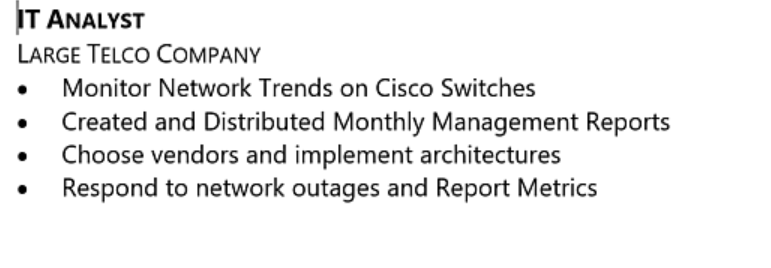
The problem with this experience is that it’s generic and doesn’t show anything that’s useful. It just tells me you worked someone where.

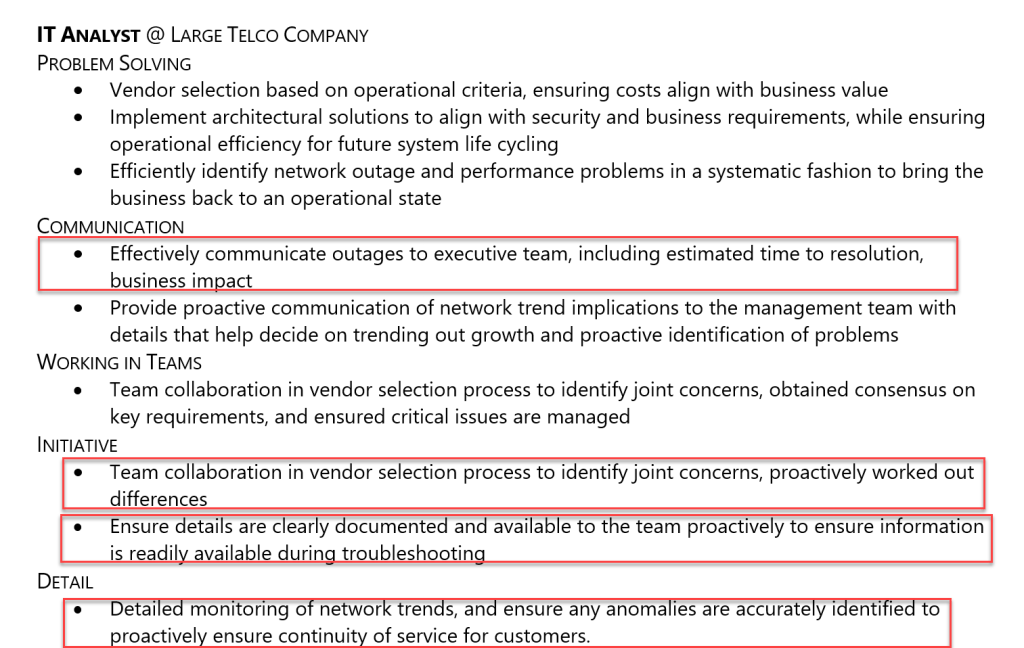
Here is my “Skills Skeleton” that we covered in my previous videos/posts. It has buckets to talk about the job experience, but also includes buckets of how I demonstrated different skills.

To fill out my job experience, I would copy points from here to the parts that hit the requirements of the job. Reminder, these include strong communication skills, ability to pay attention to detail, collaborate (or working in teams), and be a self starter. So here is the final outcome that I’m putting in my resume:

As you can see, by reading this section, the hiring manager sees how you’re very skilled to do the things that he/she needs filled in that role. This will guarantee you that interview position if you position yourself this way.

1 Bit of Advice

Remember what the job listing is about. A company is looking to hire someone to do a job. If you don’t show any experience in doing that job, you won’t be asked for an interview. They aren’t here to train a random person into a role. At the end, your resume should have 3 checks:

  1. Review all Mandatory skills – if you don’t have those, make sure you show in the resume you have an active course to learn it. Complete it by the interview.
  2. Try to show a lot of “Optional Skills required” in your job experience
  3. Demonstrate that your experience reflects the “job skills required” and “soft skills required” from the job posting.

Your life would be a lot of easier if you make sure you create that skills skeleton we talked about and consistently add to it with your new skills. Add all the skills of each course you take that you know well, and keep immersed in new technology. Good luck out there!

Sometimes it just takes seeing

I’ve written the first 2 blogs and posted videos of the Broken IT Resume, but I’ve seen some questions come up about how to actually do it. What I’m going to do is post a video specifically showing how I would edit a resume.

Hopefully, seeing the edit in person can help you understand how to categorize and optimize your skills to get your IT Resume! I’m hopeful this is helpful for you!

NOTE – When you watch the video the first time, get your first opinion in the first 10 seconds. This is what I covered before in my previous blogs/videos, understand the look and feel you get when you see it. This will go a long way in having your resume selected to the yes pile.

Also, not how I bucket everything. The end state, remember this: if you have 2 minutes to determine to hire the candidate, can you recognize his/her skills quickly? That’s the point of bucket/categorizing your skills. Make it easy for an IT hiring manager. They are skills oriented and methodological. So play to that personality by organizing your content that way.

Thanks again to Sagar for providing his resume for me to help him review. If you want me to take a look, please go to the YouTube video and do a “Like” and leave a comment there. I’ll choose one person to review their resume in the future.

Stay Safe everyon!

@ITJobDotCoach